
Google Business Profile in Gemini: UK and EU access and what to set
For owners and whoever runs the Google listing in a European small business: whether to connect it to Gemini, from which account, and who answers the new Message button in Maps.
In this article8
You can now connect Google Business Profile to Gemini in the UK and in EU countries such as Germany and Poland, but only from a personal Google Account, with one verified profile and with the Keep Activity setting switched on. Google's help page says Workspace business accounts are not supported yet. Correct as of 9 November 2026.
For a small business this is a trade between convenience and control. Gemini will fix your opening hours or draft a review reply in a minute. In return, your conversations about the business sit in someone's personal Google Account, under consumer terms.
What changed in early November
On 5 November 2026 Google published its small business bulletin with three changes that matter for your listing. Search Engine Journal reported on it the next day.
First, Gemini for Workspace accounts. The bulletin says access is "rolling out now" and that an admin must first enable the Gemini app in the Admin console. Google's help page does not confirm this yet. Where the two disagree, we follow the help page.
Second, two time savers. In Gemini chat you can upload photos to your profile from your phone or Google Photos. In the profile's own hours editor, a "Generate hours" section turns a plain description ("Saturdays 10 to 2") into filled-in opening hours. You review the edits before saving.
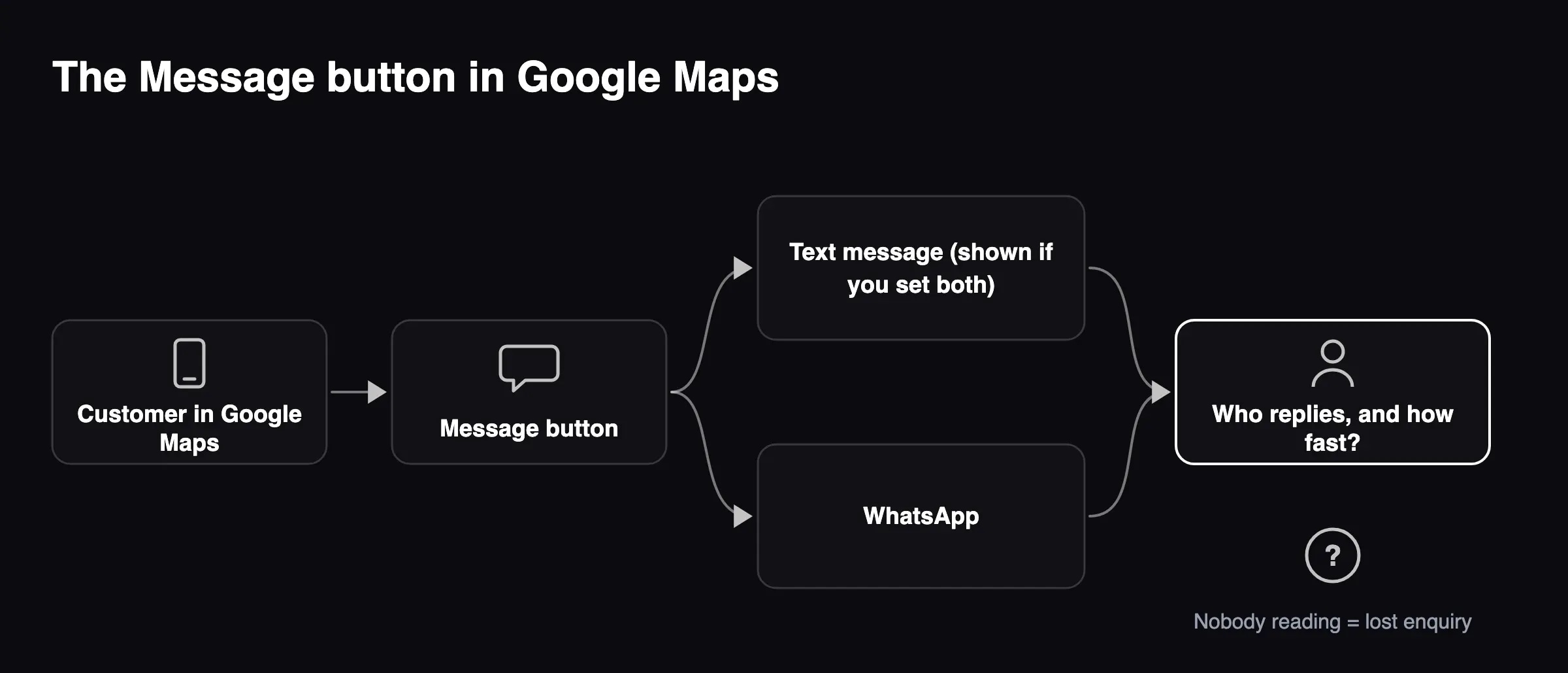
Third, the change your customers will notice. In Google Maps on Android and iOS, a Message button now sits right next to Call. Until now, chat was buried deep in the profile.
Is the Gemini connection available in the UK and EU?
Yes, according to Google. Both the Business Profile help page and the Gemini table of connected apps say the feature works in every country and language where the Gemini web app is supported. The UK, Germany, Poland, Norway and Iceland are all on that list.
That is recent. The version of the help page archived on 13 October 2026 excluded the EEA and the UK and listed 12 languages. Many guides and AI assistants still repeat the old answer.
The conditions are narrow:
- Personal Google Account linked to the profile. What it means for a business of 10-200 people: your Workspace account will not work. Chats land in the personal account of the owner or an employee.
- Owner or manager of only one verified profile. What it means for a business of 10-200 people: a business with several locations, or an agency managing many listings, cannot connect.
- Keep Activity switched on. What it means for a business of 10-200 people: without it, Gemini cannot connect to the profile. Chats are saved to the account's history.
- Gemini web app (gemini.google.com) or the Windows app only. What it means for a business of 10-200 people: the Gemini mobile app does not support it.
The Business Profile help page mentions only the web app; the connected apps table adds the Windows app.
You can disconnect the profile at any time in Gemini's connected apps settings. Disconnecting does not delete earlier chats from your activity.
What happens to your data with Keep Activity on
For the Business Profile connection you have no choice: it does not work with the setting off.
The Gemini Apps Privacy Hub (questions section updated 26 October 2026) says:
- With Keep Activity on, Google uses your activity to build and improve its products, and that includes training generative AI models.
- Human reviewers read a subset of chats. Google disconnects them from your account before review.
- Activity is deleted after 18 months by default. You can change that to 3 or 36 months.
- Chats that reviewers have looked at are kept for up to three years, even after you delete your activity.
The profile data itself (hours, address, public reviews) is public anyway. The risk is in what you type around it: a customer's name from a complaint, an invoice amount, why a member of staff left. A simple rule for your team: only type into Gemini what you would be happy to pin on your shop door.
Work and school accounts may come with different data handling terms. For now that does not help, because the help page says you cannot connect the profile from a Workspace account.
The new Message button in Google Maps: who replies?
The Message button only appears if you have set up chat on your profile. You do that under Edit profile, then Contact, then Chat: you choose WhatsApp (a click-to-chat link) or text message (a number that can receive texts).
Three details from Google's help page that are easy to miss:
- If you add both WhatsApp and text, customers see only the text option.
- Chat is available in "select regions", and Google does not name them. Check whether you can see the Chat field in your dashboard at all.
- Chat activity shows up in your profile's performance metrics.
A button next to Call is a promise. If the text number sits on an old phone in a drawer, or the WhatsApp inbox gets checked once a week, those enquiries are lost. Leaving chat switched off is better than switching it on with nobody answering.
Businesses that get a lot of repeat questions will start thinking about automation. That only works once you have decided which questions a system may answer on its own and which go to a person. We covered this in our pieces on customer service automation that doesn't turn you into a call centre and on human oversight of AI in a small business.
What we see in the market: AI assistants get this wrong
On 9 November 2026 we asked five AI assistants the same question: can a small business in the UK or EU connect its Google Business Profile to Gemini, and what happens to the data?
- ChatGPT (with search). What it said: not in the UK or EEA; correctly flagged Keep Activity. Matches Google's help page?: availability out of date.
- Perplexity (asked in Polish). What it said: not in the EEA; correct on personal account, Keep Activity and history. Matches Google's help page?: availability out of date.
- Claude (asked in Polish). What it said: available; connect through the mobile app. Matches Google's help page?: wrong: web and Windows app only; missed Keep Activity.
- Google AI Mode. What it said: available in the EU; safer through a paid Workspace plan. Matches Google's help page?: wrong: Workspace is not supported.
- Gemini. What it said: available in the UK and EU; personal account, one profile, Keep Activity. Matches Google's help page?: matches.
Assistants repeat what was true three weeks ago or fill gaps with plausible details. For decisions about business data, read the provider's help page, not a chatbot's summary. The same applies to whether AI tools know about your business at all. We explain how to check that in does AI mention your company.
What this means for your company
Probable conclusion: in many small businesses the Google listing still sits on the personal Gmail of the owner or whoever set it up years ago. Gemini adds a history of conversations about the business to that same personal account. When that person leaves, you lose both at once. Basis: Google's personal account requirement and our own client conversations. We have no figures for Europe.
Probable conclusion: for a single-location business that keeps sensitive details out of its chats, Gemini saves real time on hours, posts and review replies. For multi-site businesses and agencies, the connection does not work today. Basis: the conditions in Gemini's connected apps table.
Hypothesis to test: a Message button next to Call will bring more Maps enquiries over the holiday season. You can check this in your profile's chat metrics in January. Basis: the interface change announced on 5 November 2026; Google has published no numbers.
It is the same pattern we described with personal AI accounts at work. A tool arrives through someone's personal login, and the data decision gets made by accident.
What to do this week
Five steps, about an hour in total:
- Check who owns and manages your Business Profile, and on which accounts. If the only owner is one person's personal Gmail, add a second owner.
- Decide whether you connect the profile to Gemini. If you do, pick one person and one rule: public information only. In Gemini Apps Activity, set auto-delete to 3 months.
- Open Edit profile, then Contact. If you see a Chat field, add a number or WhatsApp link that someone reads every day. If nobody can, leave it empty.
- Set holiday hours for 25-26 December, 1 January and any local public holidays, so Maps does not show "open" at a locked door.
- If enquiries from Maps, WhatsApp and phone start to overlap, count how many arrive each week and how many hours they take. That number tells you whether you need an AI agent for customer enquiries, with a person approving replies on difficult cases, or simply a better rota.
We have not tested the connection on a UK or EEA account, and we are not a Google partner. We also cannot tell you whether using Gemini this way is GDPR compliant for your business. That is a question for your data protection officer or a lawyer.
Sources
- Google Business Profile Help: "Manage your Business Profile on Google with the Gemini web app", https://support.google.com/business/answer/17142585?hl=en (accessed 9 November 2026)
- Gemini Apps Help: availability and requirements of connected apps, https://support.google.com/gemini/table/17434654?hl=en (accessed 9 November 2026)
- Gemini Apps Help: Gemini Apps Privacy Hub, https://support.google.com/gemini/answer/13594961?hl=en (accessed 9 November 2026)
- Google Business Profile Help: chat via WhatsApp or text message, https://support.google.com/business/answer/15013580?hl=en (accessed 9 November 2026)
- Search Engine Journal, Matt G. Southern, "Google Gemini Business Profile Tools Are Coming To Workspace", 6 November 2026, https://www.searchenginejournal.com/google-gemini-business-profile-workspace-2/596120/ (accessed 9 November 2026)
- AppWave test of five AI assistants, 9 November 2026 (ChatGPT, Perplexity, Claude, Gemini and Google AI Mode, with web search)
Questions & Answers(FAQ)
According to Google's help pages (as of 9 November 2026), yes. The connection works wherever the Gemini web app is supported, and that list includes the UK, Germany, Poland, Norway and Iceland. In mid-October 2026 the same page excluded the EEA and the UK. If you cannot see the option, check the conditions: personal account, one verified profile and Keep Activity on.
Google's help page says no: you need a personal Google Account linked to the profile, and work or school accounts are not supported yet. A Google bulletin of 5 November 2026 says Workspace access is rolling out, but the help page does not confirm it. Until it does, assume only personal accounts work.
The connection requires Keep Activity to be on. With it on, Google may use your chats to improve its services, including training generative AI models, and human reviewers read a sample of chats. Activity is deleted after 18 months by default, but chats that reviewers have looked at are kept for up to three years.
It is a button next to Call on Business Profiles that have chat set up, in the Maps app on Android and iOS. It opens the channel the business chose: WhatsApp or text message. If you add both, customers see only the text option. Google says chat is available in select regions but does not list them.
Google's table of Gemini connected apps lists no required subscription for Business Profile. The free Gemini web app on a personal account is enough. The cost is in data terms: chats with Keep Activity on follow the rules for personal accounts, not the different data handling terms that may apply to work accounts.
About the author

Mateusz Cieśliński
Co-Founder, DevOps Engineer
Matthew Cieslinski is a co-founder and DevOps Engineer at AppWave, a software house that builds AI systems that companies actually use. He specializes in cloud infrastructure (AWS), container environments (Docker) and the operational side of AI deployments - so that they work stably in production, not just in the pilot phase. He operates from Lodz, Poland.
Got a similar process on your side?
If something in this article sounds like your day-to-day - let's talk. We'll tell you plainly what can be improved, and what's not worth touching.
Services related to this topic
Custom web software
Off-the-shelf tools force you to compromise. We build a system around your process, with AI where it genuinely gives an edge.
Customer service automation
Not another chatbot. An agent wired into your email, CRM and knowledge base that takes over repetitive work.
AI implementation review
Before you spend anything - we show, in numbers, where AI pays off and whether it's legal.